Tool reference
This page catalogs every tool kenny exposes to Claude — over MCP (a local client) and in
the dashboard chat — and explains which ones can change a PC, who has to approve them, and
where each call is recorded. For the operator workflow around these tools, see
user-guide.md.
Two kinds of tools
kenny splits its tools into two families:
- Capability tools run on a single Windows PC. They require an active agent (set
with
select_agent) and forward arequestframe to that agent through the tunnel, returning the agent'sresponse.powershell_exec, thefs_*,winget_*,diag_*,net_*tools,screen_capture,remotehelp_*,telemetry_collect, andagent_updateare all capability tools. - Server-only orchestration tools read the registry, telemetry store, and health rules
on the server. They are never forwarded to an agent:
list_agents,select_agent,fleet_overview,agent_health,agent_snapshot(plus the server-side web-filter tools).
Windows-only capabilities stay green on Linux CI
Capability tools that touch Windows internals have portable fallbacks in the agent, so
cargo test / cargo build pass on Linux dev and CI. On a non-Windows host the
affected tools return error.code = "unsupported" rather than failing the build. This
is the agent's #[cfg(windows)] discipline.
The confirm-gate & who enforces what
Every tool is classified read-only or state-changing. In the dashboard chat, read-only tools run automatically; a state-changing tool call pauses the loop and surfaces a confirmation card to the operator with the exact tool and arguments. The default policy is deny — nothing runs until the operator explicitly approves, and only then does the loop resume.
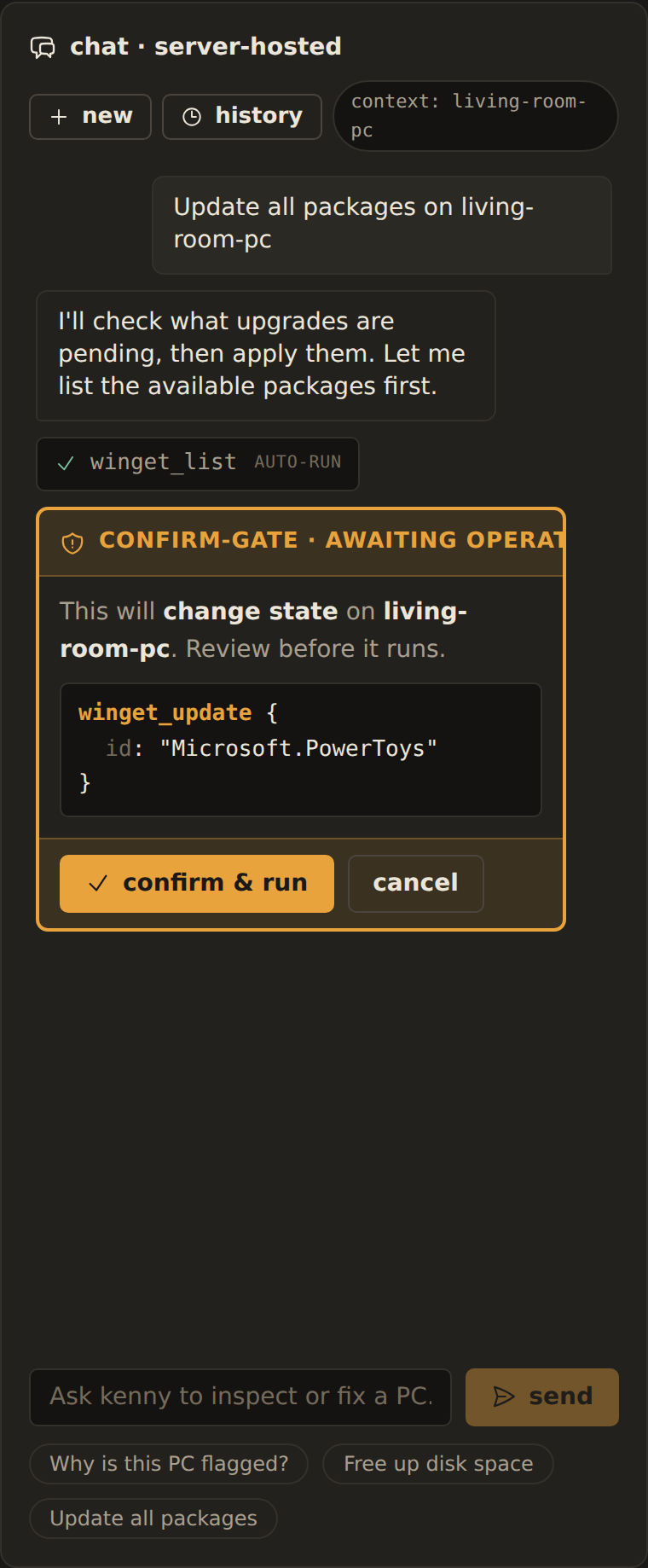 The confirm-gate pausing a state-changing
 winget_update until the operator approves.
The confirm-gate lives in the dashboard chat loop, so it is worth being precise about what each layer guarantees:
| Control | Where it lives | What it does |
|---|---|---|
| Confirm-gate | Dashboard chat loop (server) | Pauses every state-changing tool for explicit operator approval; default deny. |
| Role & host scope (ADR-0037) | Auth middleware + tool layer (server) | The access token — an OAuth token (ADR-0041) or a personal access token — identifies a user; a user-role caller only sees/targets its assigned hosts (select_agent, agent_*, forwarders, and list_agents/fleet_overview are scope-filtered), and parental-controls mutation tools require operator+. The legacy shared token acts as a superuser. |
| Agent-side safety guard (ADR-0020) | Compiled into the agent | Deterministically refuses individually catastrophic calls (disk wipes, shadow-copy deletion, event-log clearing, Defender disable, sensitive-path fs_*, unlisted agent_update hosts) regardless of operator approval — and it cannot be turned off from the server. |
| Local kill-switch (ADR-0011) | Agent + tray, at the PC | The person at the PC turns all state-changing tools off. Forwarded calls then return error.code = "disabled"; telemetry and read-only tools keep working. |
A raw MCP client is not confirm-gated
The confirm-gate is a property of the dashboard chat loop, not of the server's tool
surface. A raw external MCP client (e.g. Claude Desktop) pointed at /mcp is not
confirm-gated by the server. The agent-side guard and the local kill-switch still apply
— they are enforced at the agent, the boundary that actually runs the command — so they
hold no matter who calls the tool.
Capability tools
Names are exactly as they appear on the wire, over MCP, and in the chat.
Shell
| Tool | Arguments | State-changing? |
|---|---|---|
powershell_exec |
script, timeout_s |
✅ |
Files
| Tool | Arguments | State-changing? |
|---|---|---|
fs_list |
path |
read-only |
fs_search |
root, pattern |
read-only |
fs_read |
path |
read-only |
fs_disk_usage |
— | read-only |
Packages
| Tool | Arguments | State-changing? |
|---|---|---|
winget_list |
— | read-only |
winget_install |
id |
✅ |
winget_uninstall |
id |
✅ |
winget_update |
id? |
✅ |
Diagnostics
| Tool | Arguments | State-changing? |
|---|---|---|
diag_processes |
— | read-only |
diag_services |
filter? |
read-only |
diag_eventlog |
log, count |
read-only |
diag_autostart |
— | read-only |
Network
| Tool | Arguments | State-changing? |
|---|---|---|
net_config |
— | read-only |
net_dns_flush |
— | ✅ |
net_adapter_reset |
name |
✅ |
Screen
| Tool | Arguments | State-changing? |
|---|---|---|
screen_capture |
— | read-only |
Screenshots are captured in the interactive user session via the tray helper, not from the session-0 service (which would grab a black frame) — see ADR-0018.
Remote help
| Tool | Arguments | State-changing? |
|---|---|---|
remotehelp_status |
— | read-only |
remotehelp_start |
— | ✅ |
remotehelp_stop |
— | ✅ |
remotehelp_start launches Windows Quick Assist on the user's desktop; kenny acts as a
concierge, not the transport. A helper shares the 6-digit code and the person at the PC
must click Allow — the consent steps stay with the people
(ADR-0022).
Telemetry
| Tool | Arguments | State-changing? |
|---|---|---|
telemetry_collect |
sections? |
read-only |
Agent management
| Tool | Arguments | State-changing? |
|---|---|---|
agent_update |
version, url, sha256 |
✅ |
Parental controls
Registered on the agent when the web filter is wired up. See
parental-controls.md.
| Tool | Arguments | State-changing? |
|---|---|---|
webfilter_status |
— | read-only |
webfilter_apply |
domains, doh_policy, list_hash |
✅ |
webfilter_clear |
— | ✅ |
Server-only orchestration tools
These read server state and are never forwarded. All are read-only.
| Tool | Arguments | Purpose |
|---|---|---|
list_agents |
— | Known agents with online state and rolled-up health. |
select_agent |
id |
Set the active agent that capability tools forward to. |
fleet_overview |
— | Per-agent rolled-up health for the whole fleet. |
agent_health |
id |
Per-section health status/summary for one agent. |
agent_snapshot |
id, section? |
Latest stored telemetry snapshot (optionally one section). |
The server-side web-filter tools are also server-only. webfilter_get and
web_activity_query are read-only; webfilter_set and webfilter_push are
state-changing (they change server-held policy or push a new block list to the agent).
| Tool | Arguments | State-changing? |
|---|---|---|
webfilter_get |
id |
read-only |
webfilter_set |
id, plus config toggles / add_domain / remove_domain |
✅ |
webfilter_push |
id |
✅ |
web_activity_query |
id, hours?, flagged_only? |
read-only |
Auditing
Every forwarded capability call is appended to the tool-call audit log, annotated
read-only vs state-changing, with its agent, timestamp, and ok/error outcome. Read it in
the dashboard under Activity → tool-call audit. See dashboard.md.
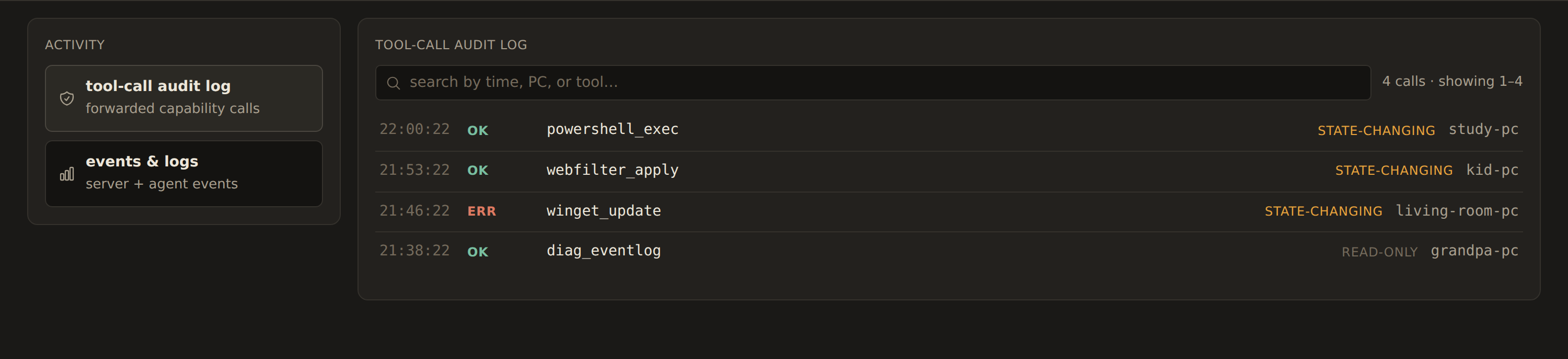 The tool-call audit log, each call tagged read-only or state-changing.
Tool naming
Tools use Anthropic-native snake_case names, identical to the wire-contract tool
catalog (ADR-0016). There is one canonical
identifier per tool across the contract, fixtures, MCP, the dashboard chat, and the agent's
dispatch table — no boundary translation. The same names you see here appear over MCP and
in the chat.
See also
user-guide.md— the operator workflow around these tools.dashboard.md— the fleet view, drill-down, and Activity tab.protocol.md— the authoritative agent⇄server wire contract.