Parental controls
kenny has an optional parental-awareness layer for the family PCs you administer. It can observe which domains a PC has been reaching, match them against a per-host list, and — on demand — block a set of known-harmful domains. There are two features:
- Web activity + web filter — see (and optionally block) the domains a PC visited.
- Screen time — how many interactive minutes per day a PC was actually in use.
Consent and scope
This is for machines you administer, in a family setting, with the knowledge and consent of the people who use them. kenny takes host names only — never full URLs, page titles, form data, or which user visited. Data lives behind the operator token, is treated as untrusted in chat context, and is retained like the rest of telemetry (~30 days). See ADR-0026.
The server matches, the agent enforces
The server holds each host's config and lists and does all the matching and classification. The agent stays dumb: its collector reports the domains it can observe right now (from the OS DNS client cache and each user's browser history), and — only when block mode is on — it applies a single flat block list idempotently (a marker-delimited hosts-file block plus optional browser DoH-off), refusing any list that would blackhole self-protected names. No matching logic ever rides the wire.
Monitoring is the guarantee, blocking is best-effort
Observability does not depend on blocking. A parent gets an alarm the next snapshot after a listed site is reached, whether or not blocking was on or was bypassed (admin rights, a VPN, or a portable browser defeat host-level blocking). See ADR-0026.
Categories and precedence
Each host's effective list is layered from four sources. When the same domain comes from several layers, the highest-priority category wins:
| Category | Priority | Source |
|---|---|---|
custom |
highest | this PC's own watch / block / allow entries |
seed |
a shipped seed list of well-known adult domains (read-only, upgradable) | |
external_adult |
the StevenBlack porn-only hosts list | |
bypass |
lowest | a hagezi DoH / VPN / proxy bypass list |
Matching is a suffix match: sub.bad.example hits an entry for bad.example. When
several block entries match, the most specific (longest) block wins. A custom allow
entry overrides a block only when it is equal-or-more-specific — a broader allow does
not unblock a narrower block. Use allow for exceptions (e.g. a homework or reference
site that would otherwise be caught by a broad list).
Only block entries (and the enabled lists) are enforced on the agent; watch entries are
matchable for the alarm but never blocked.
Health signal
When the feature is enabled for a host, the server annotates each snapshot with the domains
that matched, and the web_activity health rule escalates the PC:
| Condition (last 24h) | Status |
|---|---|
a serious flagged hit — custom, seed, or external_adult |
🔴 crit |
a bypass hit |
🟡 warn |
| nothing flagged | 🟢 ok |
If the host is not configured for parental controls, the rule simply defers. The flagged hits appear in the section detail with domain, category, matched entry, and last seen.
The list editor
Open a PC, then click the web_activity section tile to open its detail popup.
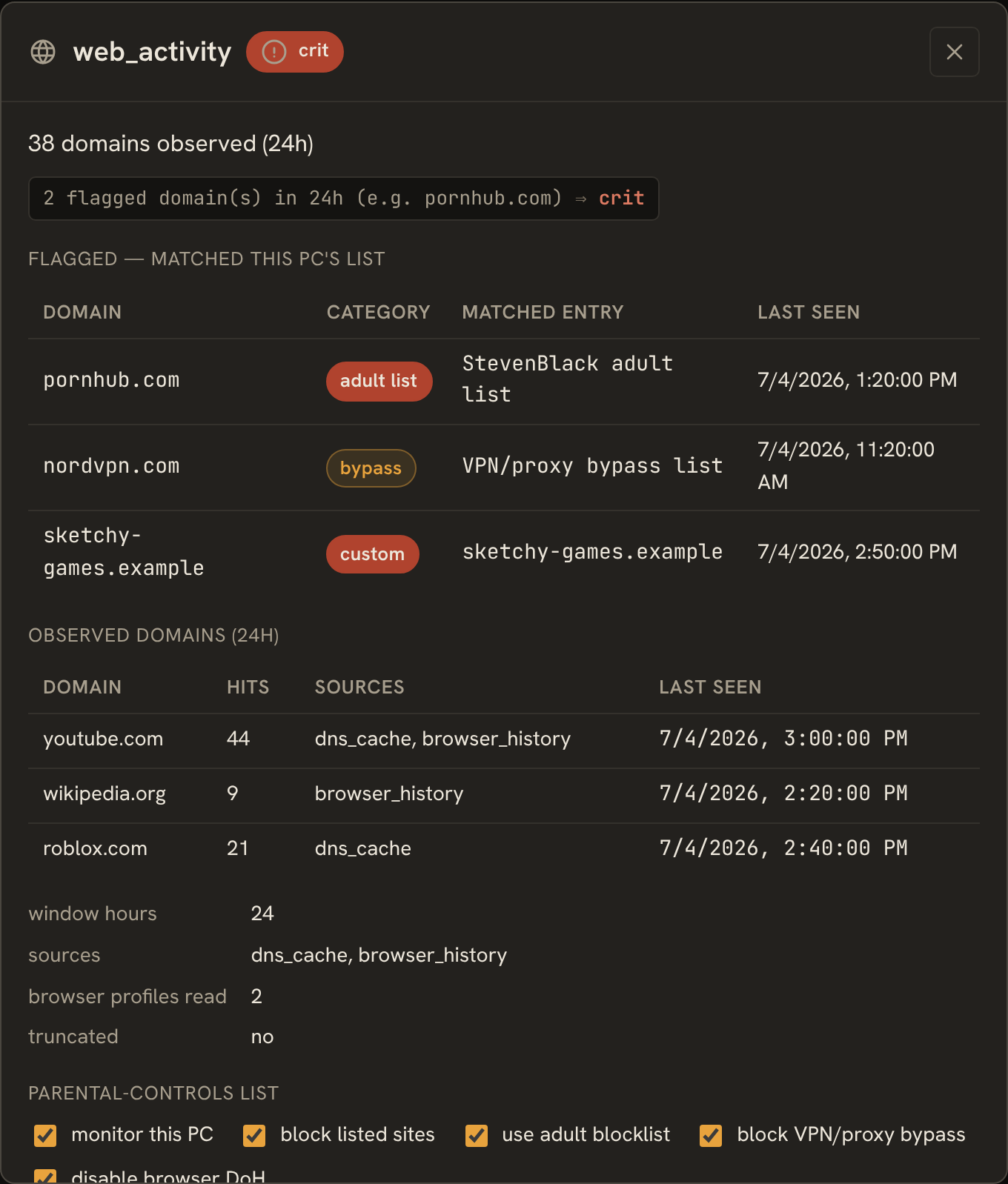
The popup shows three things:
- Flagged — domains that matched this PC's list (domain, category, matched entry, last seen).
- Observed domains (24h) — everything the agent saw, with hit counts and sources.
- The per-host parental-controls list editor.
The editor's toggles:
| Toggle | Config field | Effect |
|---|---|---|
| monitor this PC | enabled |
observe web activity and match it against this list |
| block listed sites | block_mode |
push the block list to the agent (hosts file + DoH off) |
| use adult blocklist | use_external_adult |
reference the StevenBlack porn-only list |
| block VPN/proxy bypass | use_bypass_protection |
also block DoH / VPN / proxy domains |
| disable browser DoH | doh_policy (disable / leave) |
turn DNS-over-HTTPS off in browsers so the hosts block can't be bypassed |
Below the toggles you can add a custom domain with an action — block, watch (alarm only), or allow (exception) — remove entries, and press apply now to push the current block set to the agent.
Drift and the kill switch
The panel shows drift ("list changed since last apply") when the effective list has
changed since the last successful push — a reminder to press apply now. If the local
kill-switch is off at the PC, the agent refuses to apply new rules (the apply comes
back disabled), and the panel says so — but monitoring keeps working and any rules
already written to the hosts file persist until cleared.
Defaults: use_external_adult is on and doh_policy is disable. Editing the
list re-flags from the next snapshot (~15 min); the detail view's activity list matches live,
so it is always current.
External lists
The server fetches the two external sources over HTTPS on a timer (default every 24h), with a write-through disk cache and a seed/stale fallback when offline, guarded by size caps against an oversized upstream. The adult-list extract pushed to the agent is capped (default 5000 domains, hard cap 10000) so a large hosts file can't bog down the Windows DNS Client service.
The URLs, refresh interval, and cap are environment-overridable — see setup.md:
KENNY_WEBFILTER_REFRESH_SECSKENNY_WEBFILTER_ADULT_URLKENNY_WEBFILTER_BYPASS_URLKENNY_WEBFILTER_MAX_BLOCK_DOMAINS
Screen time
The screen_time section reports, for the whole machine, aggregated interactive
minutes per calendar day over the last 7 days — and deliberately nothing finer. There is
no per-app, per-window, or per-user tracking and no timestamps below the day bucket; the
payload shape structurally cannot express who was logged in or what ran.
It appears as horizontal per-day bars in the screen_time section detail and is summarized
in the weekly digest. No health rule judges it — the section is always ok; kenny
reports, parents judge. See ADR-0032.
Driving it from the copilot
The dashboard chat and any MCP client can drive parental controls too. The server-only tools:
| Tool | Args | Changes state? |
|---|---|---|
webfilter_get |
id |
read-only |
web_activity_query |
id, hours?, flagged_only? |
read-only |
webfilter_set |
id, plus config toggles / add_domain / remove_domain |
✅ |
webfilter_push |
id |
✅ |
webfilter_push forwards the mutating webfilter_apply / webfilter_clear calls to
the agent (refused with disabled under the kill switch). See tools.md.
See also
user-guide.md— the operator's tour of the fleet view and drill-down.dashboard.md— the fleet view, drill-down, and Activity tab.telemetry.md— how sections, collectors, and health rules fit together.alerting.md— howwarn/critsurface and the weekly digest.- ADR-0026 — web activity + web filter.
- ADR-0032 — screen time.